 Torana
PII plugin · 4 October 2026
Scan tool output for PII with a local model.
Check your coding agent's tool output for API keys, passwords and private personal data before it reaches your hosted model. Torana's pii plugin sends new tool results to a local scanner and replaces flagged results with an explanation.
This guide covers the setup, the models compared, and the catches and false positives observed. Start with the walkthrough, or use the results to decide which scanner to experiment with. This is an extra check, not complete protection.
Try it yourself ↓ · Read the comparison ↓ · Build on the idea ↓
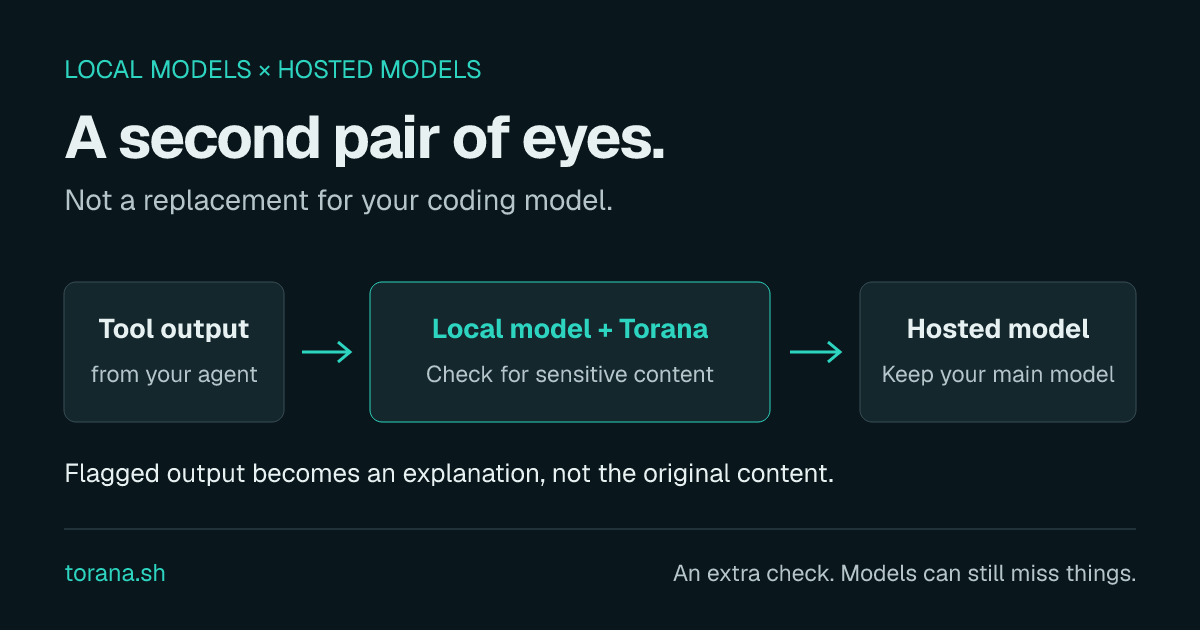
How the PII check works
Reading a file happens on your machine. The returned text can then become part of the coding agent's next request to its model provider. An incidental API key or password can go with it.
Torana sits in that request path. The model-backed pii plugin sends eligible new tool results to the scanner you configure. When it reports sensitive content, the plugin replaces the whole affected result with a value-free explanation. The hosted model can acknowledge that explanation or request different content. A safe continuation is possible, not guaranteed.
The scanner sees a tool name and numbered output, not the entire conversation or a guaranteed original file path. Its reported line numbers are positions in that output, not necessarily file lines. Historical replacements replay on subsequent turns instead of rescanning the whole conversation.
Which local models caught PII and secrets?
The October 1 study compared seven local chat models plus specialised detectors, a decision model, a research-only adaptation, and the actual deterministic guard. The chat models used Q8 GGUF weights on an Apple arm64 Mac with 24 GiB unified memory. These are historical measurements of the study's prompt and parser, not a fresh benchmark of every later plugin release.
The frozen primary set contained 48 development cases, 120 test cases, 12 policy-ambiguous cases and 19 stress cases. The test split below has 60 sensitive and 60 benign examples. They are investigator-authored and correlated within families, not an independent real-world benchmark.
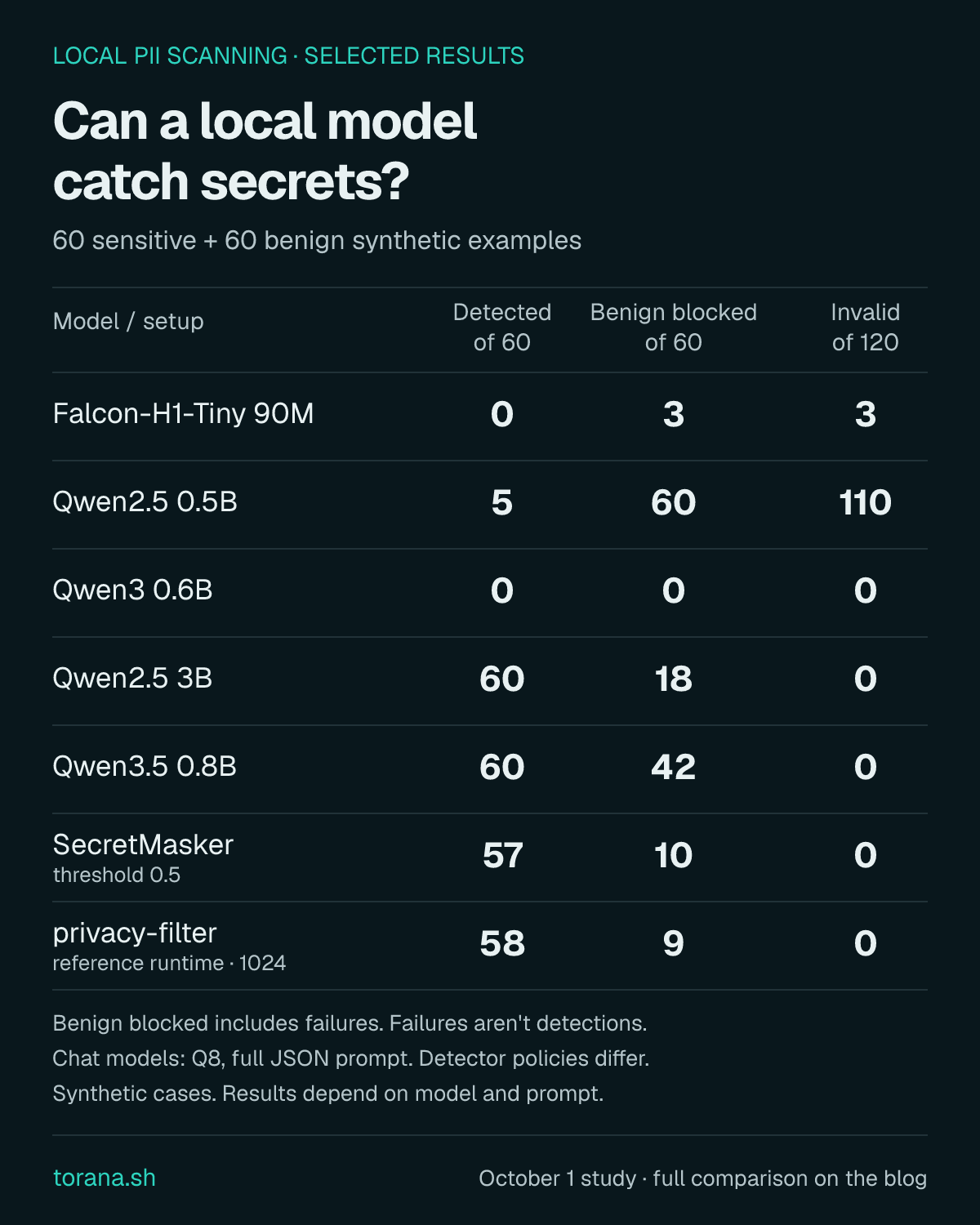
| Model / configuration | Detected / 60 sensitive | Withheld / 60 benign | Invalid / 120 total |
|---|---|---|---|
| Falcon-H1-Tiny 90M | 0 | 3 | 3 |
| Qwen2.5 0.5B | 5 | 60 | 110 |
| LFM2.5 350M | 48 | 60 | 24 |
| Qwen3 0.6B | 0 | 0 | 0 |
| LFM2.5 1.2B | 0 | 60 | 120 |
| Qwen2.5 3B | 60 | 18 | 0 |
| Qwen3.5 0.8B | 60 | 42 | 0 |
| Ettin17M · broad entity policy | 55 | 33 | 0 |
| Ettin68M · broad entity policy | 54 | 37 | 0 |
| SecretMasker · threshold 0.5 | 57 | 10 | 0 |
| SecretMasker · threshold 0.99 | 43 | 3 | 0 |
| Laya · native short-input call | 55 | 28 | 0 |
| privacy-filter · reference runtime | 58 | 9 | 0 |
| Adapted Ettin17M · research pilot | 57 | 18 | 0 |
| pii_guard · deterministic baseline | 24 | 0 | 0 |
Withholding is not the same as detecting. Invalid scans defaulted to withholding. They count in the benign-withheld column, but never as correct detections. For example, Qwen2.5 0.5B returned 110 invalid answers out of 120, making it unusable in that configuration despite keeping output back.
Qwen2.5 3B found all 60 sensitive examples in this split, but also flagged 18 of the 60 benign ones. That is a real usability cost, not a rounding error. Qwen3 0.6B produced valid answers yet missed all 60 sensitive cases. Structured JSON made answers parsable; it did not make them correct.
Real-code-shaped inputs changed the picture
A separate frozen reserve used public source chunks with injected synthetic credentials, single-line values and opaque non-secret hashes: 52 positive and 26 benign cases. Qwen2.5 3B's full contract detected 50 positives, with one additional invalid positive, and withheld three benign cases: two findings and one invalid scan. Two binary paraphrases landed at 37/52 and 49/52 detections, both withholding none of the 26 benign cases. Prompt wording moved results in both directions.
SecretMasker at threshold 0.5 detected 52/52 reserve positives but withheld 12/26 benign results. The adapted Ettin17M pilot detected something in 51/52 positives, but overlapped the actual injected value in only 49, and withheld 5/26 benign results. A correct yes/no answer is not necessarily a correct location.
Laya's complete-window path detected 17/52 reserve positives. Putting a classifier in front of another scanner cannot rescue the secrets the first stage decides never to send onward. Complete input coverage and correct classification are separate problems.
Why there isn't a winner badge
- The policy distinguishes public contact information, code identifiers and redacted placeholders from private data and credential values. Not every model was trained for those distinctions.
- Primary fixtures contain conspicuous synthetic markers; reserve fixtures remove that cue but remain investigator-authored. Password hashes were originally labelled benign under a non-plaintext policy; that is an acknowledged ambiguous label, not universal safe-handling advice.
- Prompts, thresholds and input size changed outcomes. After exploration, these sets are no longer untouched evidence for choosing the next model.
- The deterministic guard intentionally covers fewer formats than this combined secret-and-PII dataset. Its 24/60 is not a recall estimate for its documented supported patterns.
- No evaluated default met all the study's detection, false-withhold, validity and latency targets. Windows and Linux performance was not measured.
Specialised encoders were promising for speed, but timing boundaries differed across runtimes. Qwen3B's binary-prompt short-input median was about 478 ms; that is not a latency promise for the plugin's full JSON scan. Sequential 10K-character window experiments took roughly 9.6–16.7 seconds and did not solve the quality problem.
Runtime and integration notes
The study used llama.cpp build 10964 (b29c606e2), context 8192, one slot, four CPU threads, GPU offload, no context shift and no prompt-cache reuse. Encoder runs used CPU with four threads, PyTorch 2.14.0 and Transformers 5.17.0. Some phases overlapped, so timings are not a hardware leaderboard.
Controlled Torana tests covered Anthropic Messages, OpenAI Chat Completions and Responses: positive replacements, identical-result replay, new-result scanning and restart persistence. Matching historical prefixes in those fixtures is not a measurement of provider cache-hit rates.
Two real Claude Code Haiku sessions used synthetic files and an adapted encoder. One acknowledged withheld content without recovering safe lines. Another recovered safe lines after explicit read-range instructions. Narrower reads get fresh decisions and can still leak if classified incorrectly. Fragmentation resistance was not established.
The adapted encoder was a research-only six-epoch pilot on 900 independently generated synthetic training examples. It is not a shipped checkpoint or an independent validation result. Different prompts and later plugin changes require fresh evaluation.
Set up the PII plugin
This walkthrough uses Qwen2.5 3B Instruct Q8 as a starting experiment, not a recommended security boundary. The download is about 3.29 GB, with additional memory needed at runtime. It has a Qwen research license; check its terms before using it at work or commercially. Torana's open-source license is separate.
Allow time for the first model download. You need a supported local runtime and a signed-in coding harness. If you already run an OpenAI-compatible model server with JSON Schema output, you can use that instead and skip to registering it.
Start with small tool results to try the check. Scanning adds latency; with the default block-on-error setting, an unavailable scanner, an input beyond its context, or an exhausted model-call budget withholds the result as a scan failure, not a confirmed PII finding. Evaluate those limits before leaving it enabled for a long session.
1. Start the local scanner
Install llama.cpp. With Homebrew on macOS or Linux:
brew install llama.cppWindows or another Linux setup
On Windows, run winget install llama.cpp. For Linux without Homebrew, use the project's release binaries for your platform/backend or its installation guide. The runtime supports these platforms; the study's performance numbers are Mac-only.
In a terminal, download and serve the Q8 model. Keep this process running:
llama-server -hf bartowski/Qwen2.5-3B-Instruct-GGUF:Q8_0 --alias local-pii --host 127.0.0.1 --port 8081 -c 8192 -np 1 --jinja --no-context-shiftIf using extracted binaries, run ./llama-server on macOS/Linux or .\llama-server.exe on Windows from that directory. Wait for the model to load. If port 8081 is busy, choose a free port and use the same one in the provider settings below. Do not expose this unauthenticated server to the network.
2. Install Torana and add the plugin
In another terminal on macOS or Linux:
curl -fsSL https://torana.sh/install.sh | shWindows installer
$installer = Join-Path $env:TEMP ("torana-install-" + [guid]::NewGuid() + ".ps1")
Invoke-WebRequest https://torana.sh/install.ps1 -OutFile $installer
& $installer
Remove-Item -LiteralPath $installertorana start --port 8143
torana plugin install pii
torana openUse another free port if needed. The browser opens the running instance; later CLI commands discover its address.
3. Register the model, then enable PII
- In the control plane, open Settings → Add provider. Name it
local-scanner. - Set Upstream URL to
http://127.0.0.1:8081/v1, format toopenai, and authentication to No authentication. - Under Plugin model defaults, set Default model to
local-pii, matching the server alias. Leave the inference-path override blank. Click Save settings. - Open Pipeline → pii → Resource bindings and limits → scanner. Choose
local-scannerin Provider. - Review the requested permissions and model-call limits, then choose Approve & enable. Installation alone does not enable the plugin.
Use only pii for this experiment if you want to observe the model's decisions. Adding pii_guard first is a separate deterministic check, and changes what the model sees. The plugin guide covers CLI configuration and scanner limits.
4. Connect your agent and try both kinds of input
For a signed-in Claude Code session, run this in your test directory on macOS/Linux:
ANTHROPIC_BASE_URL="$(torana endpoint anthropic)" claudeKeep the anthropic provider on Use harness credentials. For Windows, Codex, pi, oh-my-pi, OpenCode or Antigravity, use the matching harness recipe. Your hosted provider's normal limits and billing still apply.
In a separate terminal, create a synthetic test file in the same directory. Never use a real secret:
echo 'PAYMENT_API_KEY=sk_test_torana_demo_not_a_real_key_123' > demo-sensitive.txt
echo 'RETRY_COUNT=3' > demo-safe.txtAsk the routed agent: Read demo-sensitive.txt and tell me what it contains. Then separately ask it to read demo-safe.txt. Inspect Live Feed in Torana as well as the agent's reply.
A detection should become Tool output withheld, with a value-free explanation. A scanner failure is not a detection. A harmless result should remain readable. If the agent quotes the synthetic value, the check missed it; don't substitute a successful run and call that an accuracy result. Try a single-line read too: success on a whole file does not prove success on a narrower result.
For a failure or a long delay, inspect torana plugin status, torana feed and the log path in torana status. Check that the local server is ready, the selected model alias matches, and the result fits its context and configured scan limits. Avoid repeatedly retrying a large scan.
When finished, exit the harness and launch it normally to connect directly again. Run torana stop --yes once no routed sessions need it, and press Ctrl+C in the scanner terminal. Remove the two synthetic files when you no longer need them.
Help improve PII scanning
Have a detector or a better evaluation case? Share a synthetic example and your setup. Useful contributions include benign code that gets blocked, secrets that get missed, and clearer setup instructions. Include the model, prompt or plugin version, and whether the input was a whole result or a narrower read. Please don't attach real credentials or private source.
Want to try a different scanning approach? The plugin-authoring guide shows how to build on Torana's request path and reuse a plugin across supported coding tools.
Other model sources: Falcon, Ettin PII, SecretMasker, Laya, and privacy-filter. These use different interfaces and are not all drop-in scanner endpoints.